NAS Managerby Mario DANTAS
EN

New in 1.32: encrypted configuration backup

Your NAS. Your hardware. Your rules.

NAS Manager is a complete NAS operating system that installs from a USB key on a standard x86-64 PC. Storage, sharing, apps, websites, email and virtual machines: everything a commercial NAS does, on hardware you choose.

  • Based on Ubuntu 24.04 LTS
  • UEFI & BIOS, Secure Boot
  • 6 interface languages
  • No cloud account required
NAS Manager dashboard
28
built-in modules
6
languages
1 click
signed updates
100 %
local, no subscription

Features

Everything a modern NAS needs

One coherent web interface for storage, services and security, inspired by the best commercial NAS systems.

Storage & RAID

Create volumes in the free space of your disks, with RAID 0/1/5/6/10, ZFS or Btrfs.

  • System mirrored on every disk: boots from any surviving drive
  • Snapshots, quotas and expandable volumes
  • SMART monitoring and one-click failed-disk replacement

File sharing

Share your files with Windows, macOS and Linux, with per-user permissions.

  • SMB, NFS, Time Machine and iSCSI
  • Advanced web file explorer and share links
  • Personal home folders, movable between volumes

Docker applications

Install apps in one click or paste any compose file.

  • Catalogue: GitLab, Gitea, Nextcloud, Jellyfin, Uptime Kuma, MariaDB
  • Edit, limit CPU/RAM, back up and update
  • Custom domains with HTTPS for each app

Web Station

Host websites and publish apps behind a reverse proxy, like on a Synology.

  • Web services and portals on any port
  • PHP 8.2, 8.3 or 8.4 per site, one Unix user per site
  • Let's Encrypt and wildcard certificates, SFTP publishing

Mail server

Host your own email addresses on your domains.

  • Postfix, Dovecot, Rspamd antispam, DKIM
  • Outgoing SMTP relay and DNS record checker
  • Roundcube webmail with filters and auto-reply

Virtual machines

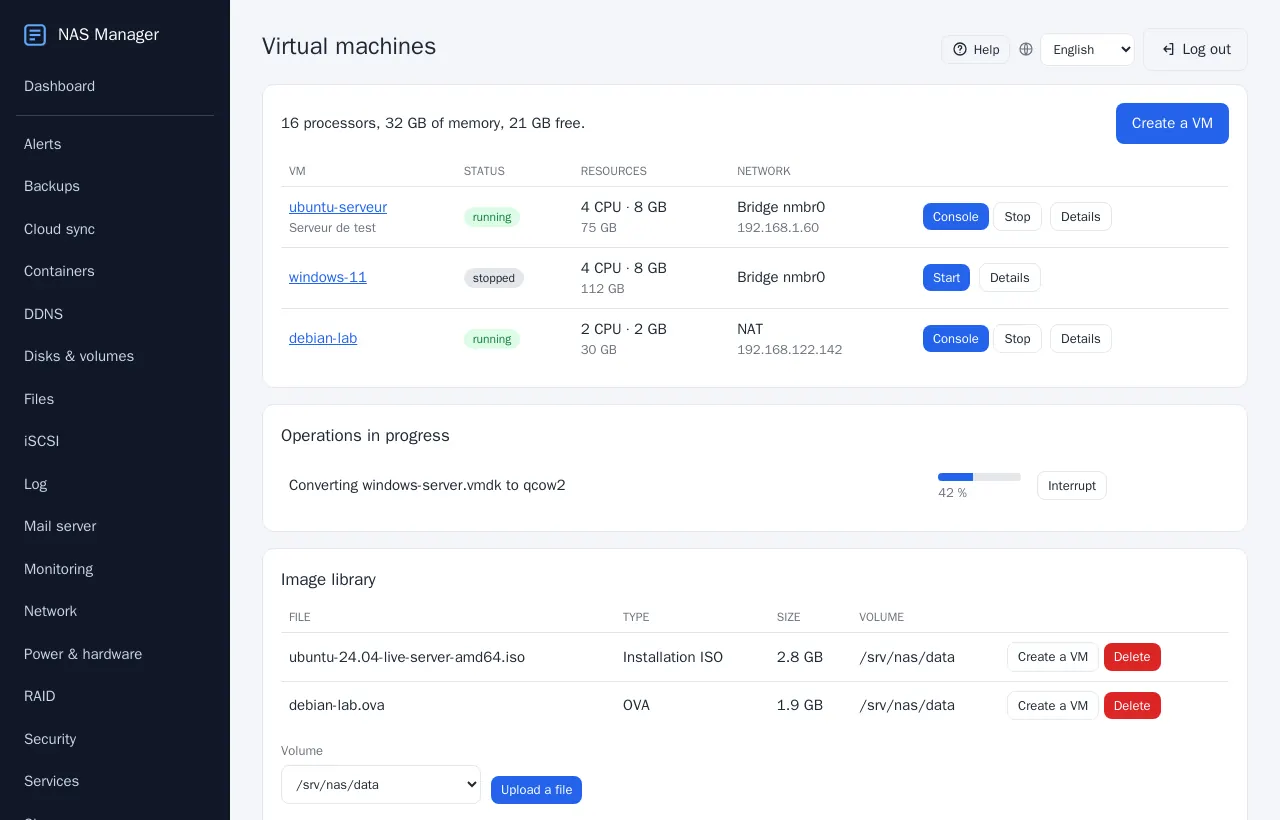
Run Linux and Windows VMs on KVM, straight from the browser.

  • Browser console, nothing to install
  • Snapshots, OVA import and export
  • Scheduled backups without stopping the VM

Backups

Protect your data locally, on another NAS or in the cloud.

  • Scheduled copies and application backups
  • To a Synology or any rsync-over-SSH server
  • Cloud sync with rclone, encrypted configuration export

Security

Secure by design, with defence in depth.

  • Two-factor authentication, firewall, fail2ban
  • Per-module and per-share user permissions
  • HTTPS interface, CSRF protection, signed packages

Network & remote access

Reach your NAS from anywhere, safely.

  • Static IP, dynamic DNS (OVHcloud, Cloudflare, DuckDNS…)
  • WireGuard VPN
  • Interface access by address, domain and HTTPS

Monitoring & alerts

Know the health of your NAS at a glance.

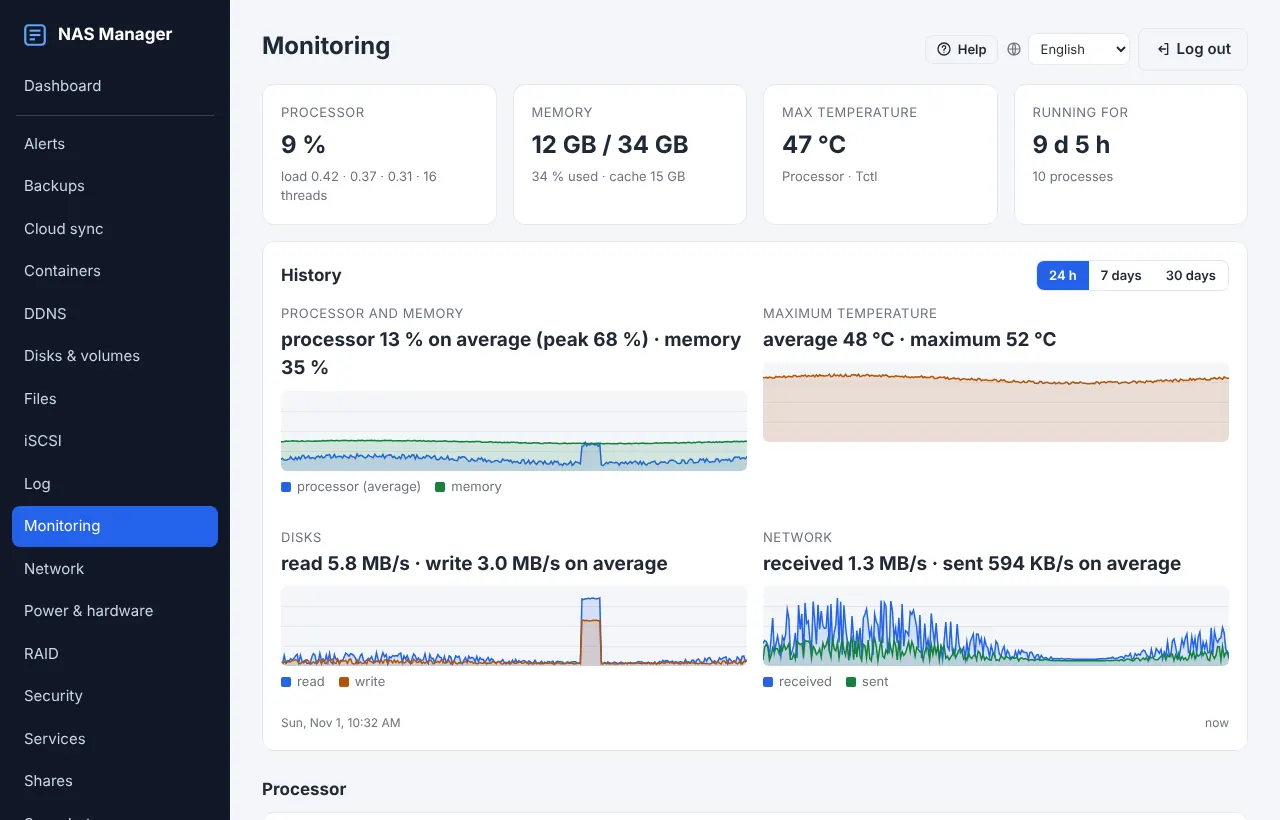
  • NAS health card, live charts and history
  • Email alerts for SMART, RAID, ZFS and disk space
  • UPS support (NUT) and system log

Shell & task scheduler

Power tools when you need them.

  • Web terminal and SSH for authorised users
  • Task scheduler: commands or PHP scripts
  • Runs as the website user or as root

Updates & local screen

A system that stays up to date and easy to use.

  • Signed one-click updates with automatic rollback
  • Ubuntu security updates from the interface
  • Interface on a local screen with virtual keyboard

Screenshots

A clean interface, in your language

Every page has built-in help with screenshots. Here is a quick tour.

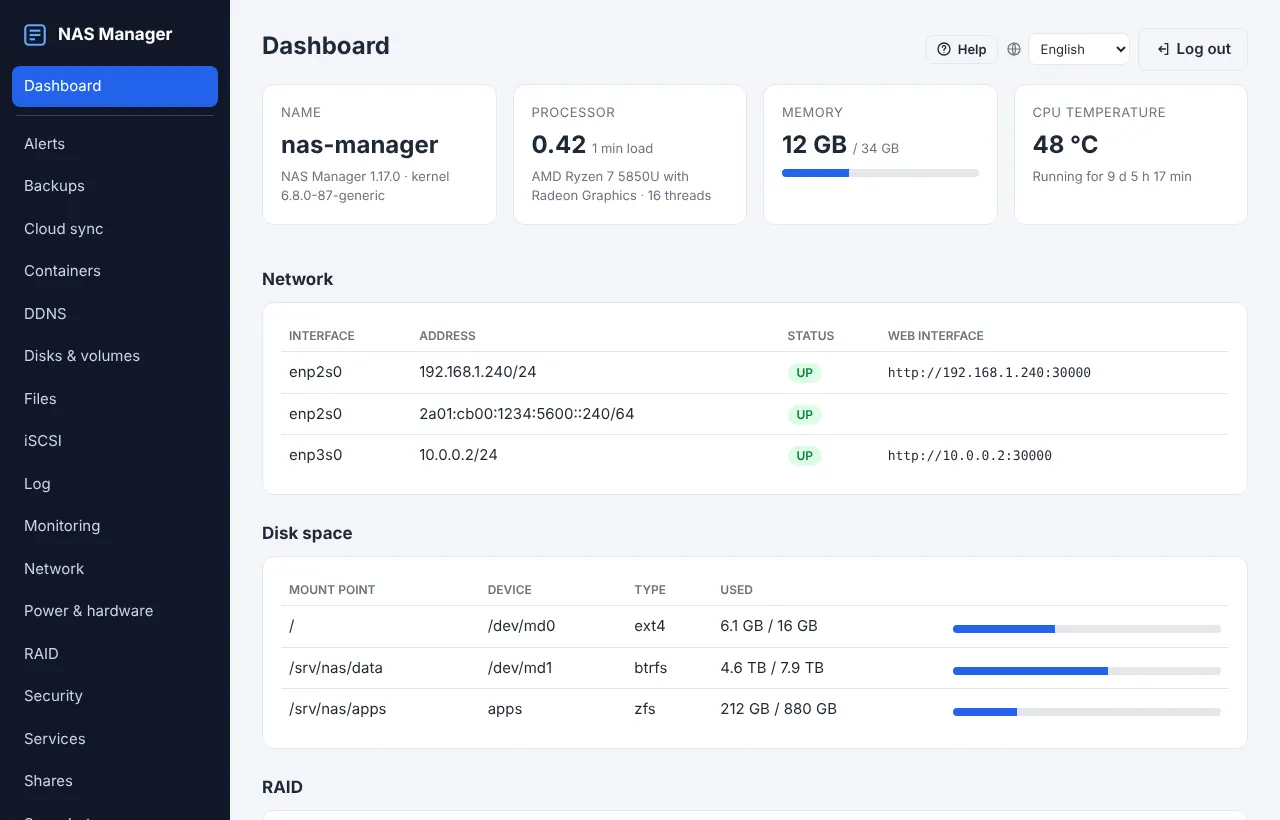
Dashboard – System, network, disk space and RAID at a glance.
Dashboard System, network, disk space and RAID at a glance.
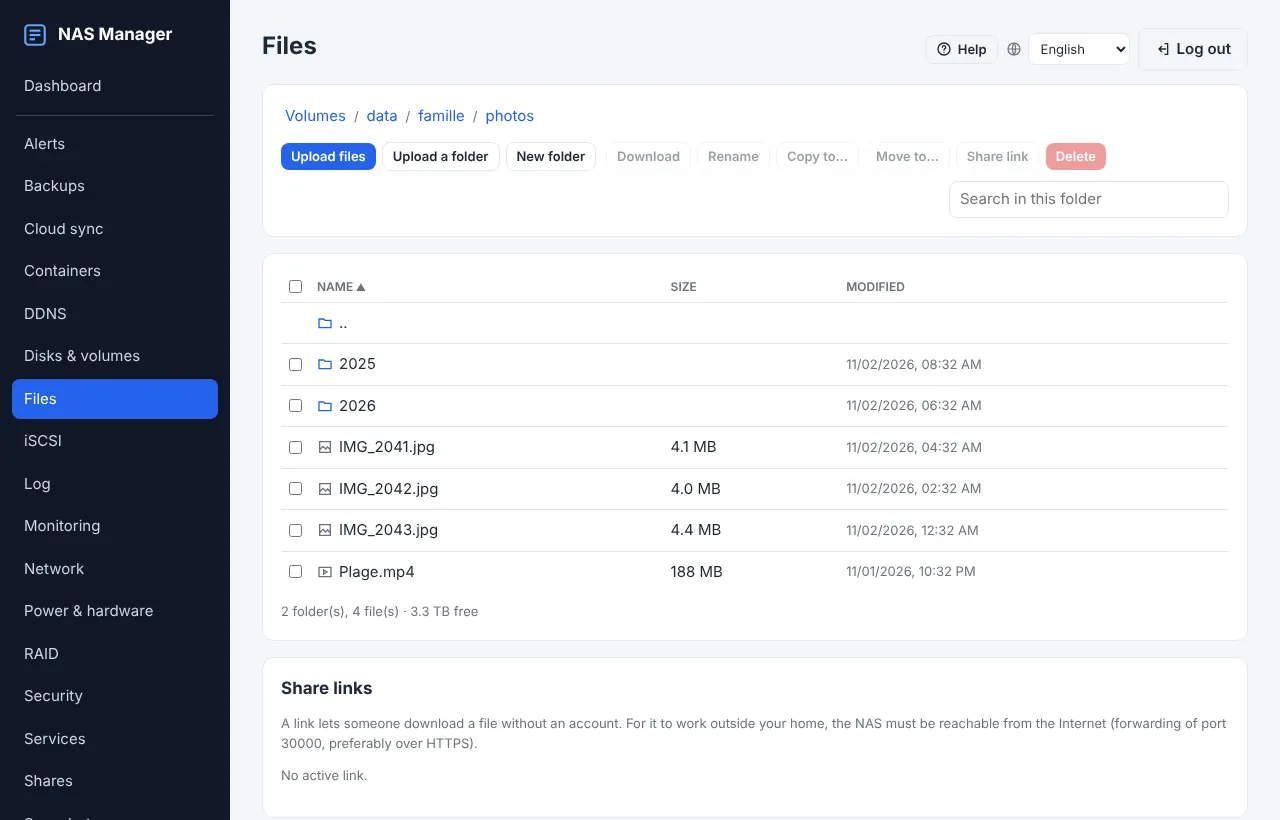
Files – A complete file explorer in the browser: upload, preview, share links.
Files A complete file explorer in the browser: upload, preview, share links.
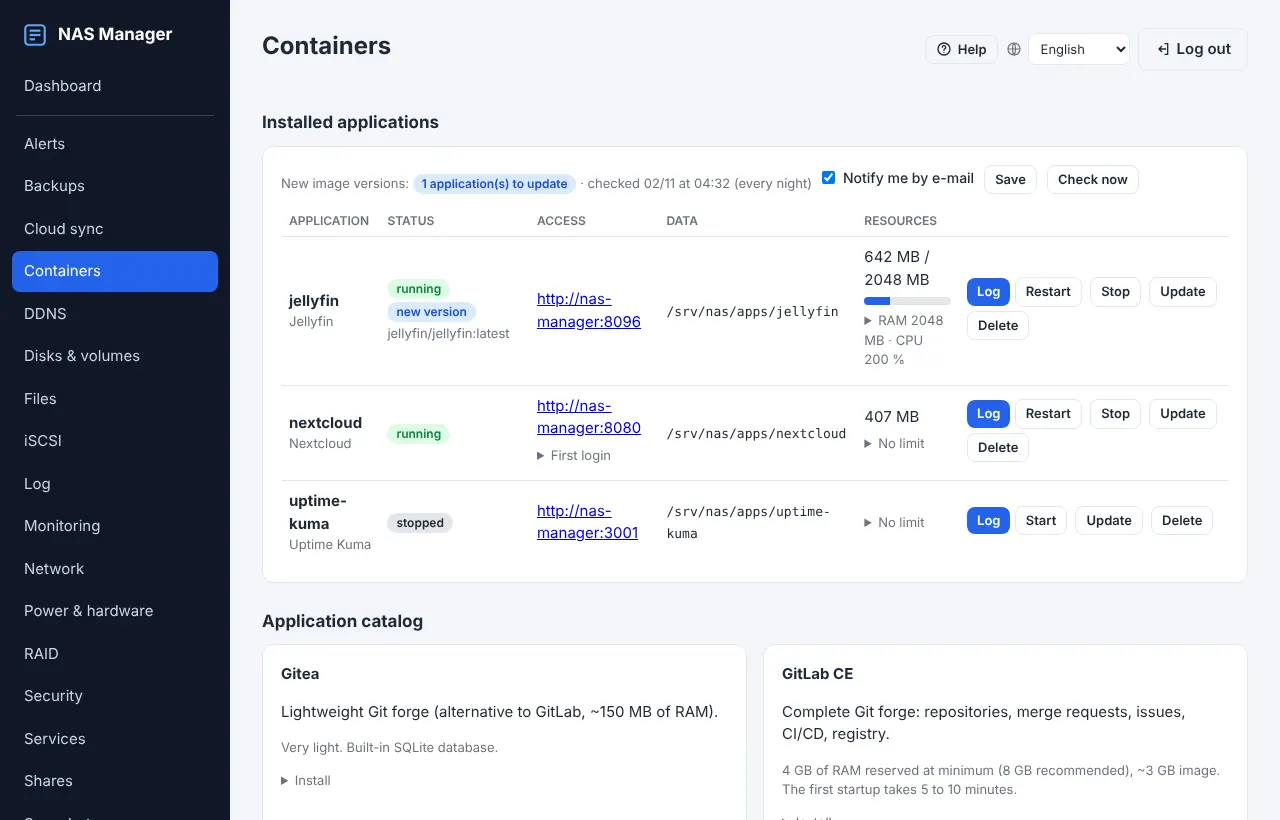
Containers – Docker apps from the catalogue or your own compose files.
Containers Docker apps from the catalogue or your own compose files.
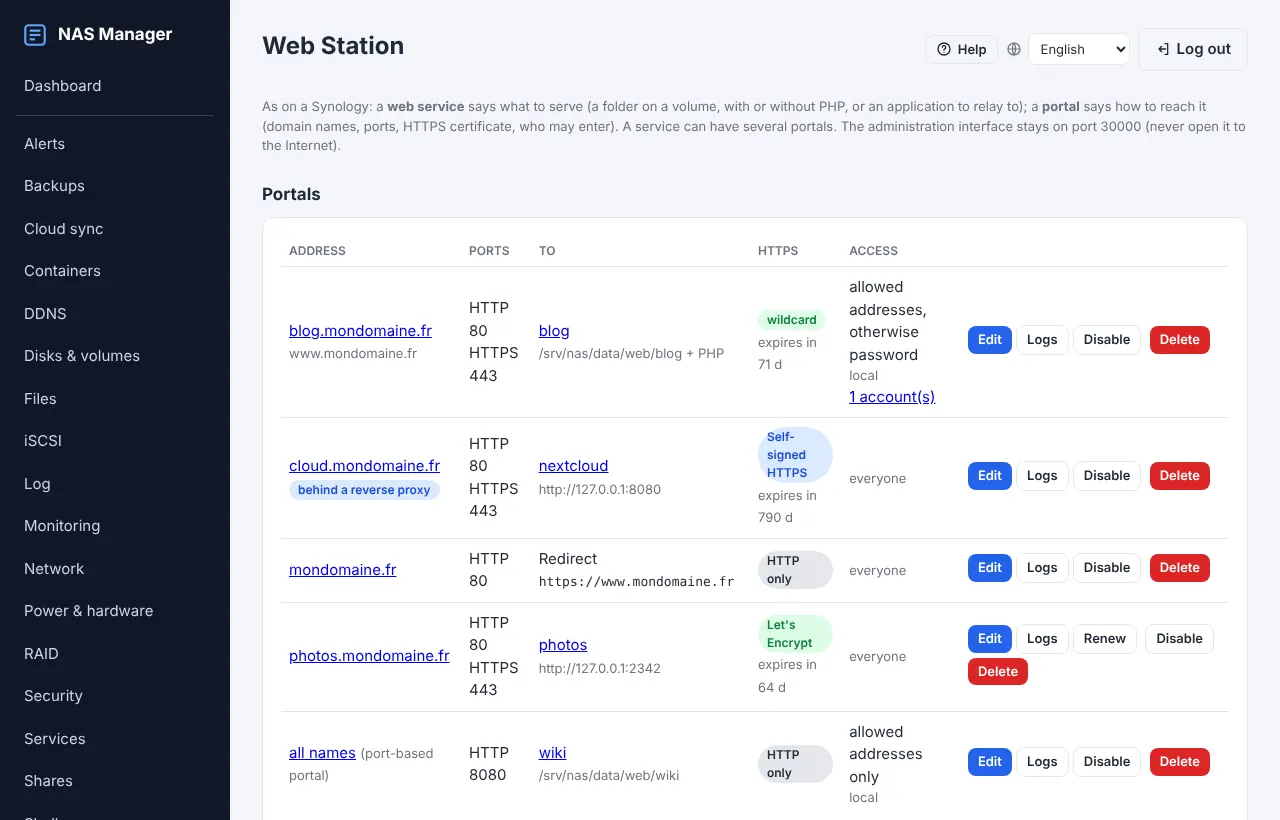
Web Station – Web services and portals with automatic HTTPS.
Web Station Web services and portals with automatic HTTPS.
Virtual machines – KVM virtual machines with console, snapshots and backups.
Virtual machines KVM virtual machines with console, snapshots and backups.
Monitoring – Live charts for CPU, memory, network and disks.
Monitoring Live charts for CPU, memory, network and disks.

How it works

Up and running in three steps

  1. 1

    Write the USB key

    Write the hybrid ISO to a USB key with Rufus or balenaEtcher. It boots in UEFI and BIOS mode.

  2. 2

    Install on your disks

    Choose the disks: each one receives a small mirrored copy of the system, the rest stays free for your volumes.

  3. 3

    Manage from your browser

    Open http://your-nas:30000 and create volumes, shares, users and apps from any computer or phone.

Specifications

Technical specifications

Base system
Ubuntu 24.04 LTS, Linux 6.8 kernel
Hardware
x86-64 PC or mini PC (designed for the AOOSTAR AMD Ryzen 7 5850U), NVMe/SATA, Intel and Realtek NICs
Boot
Hybrid ISO, UEFI and legacy BIOS, Secure Boot
File systems
ext4, Btrfs, ZFS, XFS, F2FS
RAID
mdadm RAID 0, 1, 5, 6, 10; ZFS mirror, RAIDZ1, RAIDZ2
Protocols
SMB 3, NFS, Time Machine over SMB, iSCSI, SFTP, SSH, WireGuard
Web interface
PHP 8.3 + Apache, ports 30000 (HTTP) and 30001 (HTTPS), no JavaScript loaded from the Internet
Languages
English, French, Spanish, Italian, Portuguese, German
Updates
Ed25519-signed packages, automatic backup and rollback
Version
1.32.0 (2026-11-09)

FAQ

Frequently asked questions

What hardware do I need?

Any recent 64-bit x86 PC or mini PC with at least one disk. NAS Manager was designed for the AOOSTAR mini PC with an AMD Ryzen 7 5850U, but runs on most Intel and AMD machines. 8 GB of RAM is comfortable; more if you run virtual machines or GitLab.

What happens if a disk fails?

The system itself is mirrored on every disk, like on a Synology: the NAS still boots from any remaining disk. Your data volumes are protected by RAID or ZFS redundancy, and a failed disk is replaced from the interface in one click.

Do I need an Internet connection or a cloud account?

No. NAS Manager works entirely on your local network, with no account and no subscription. The Internet is only needed for optional features such as updates, Let's Encrypt certificates or cloud backups.

Can I run my own applications?

Yes. Besides the one-click catalogue, you can paste any Docker compose file, host PHP websites in the Web Station, or create Linux and Windows virtual machines.

How are updates delivered?

Through signed .nm-update packages, installed from the Update page or downloaded automatically. The previous version is backed up first and restored automatically if anything goes wrong.

Is NAS Manager open source?

No. NAS Manager is proprietary software created by Mario DANTAS. It is built on open-source components (Ubuntu, Samba, Docker, Apache, KVM…), which keep their own licences.

Interested in NAS Manager?

For a demonstration, a question or a partnership, write to me.

Send an email

webmaster@nas-manager.com